> ## Documentation Index
> Fetch the complete documentation index at: https://docs.tryinvesti.com/llms.txt
> Use this file to discover all available pages before exploring further.
# Monitors
> Schedule an analyst request to run on its own: morning briefs, weekly checks, post-earnings reads.
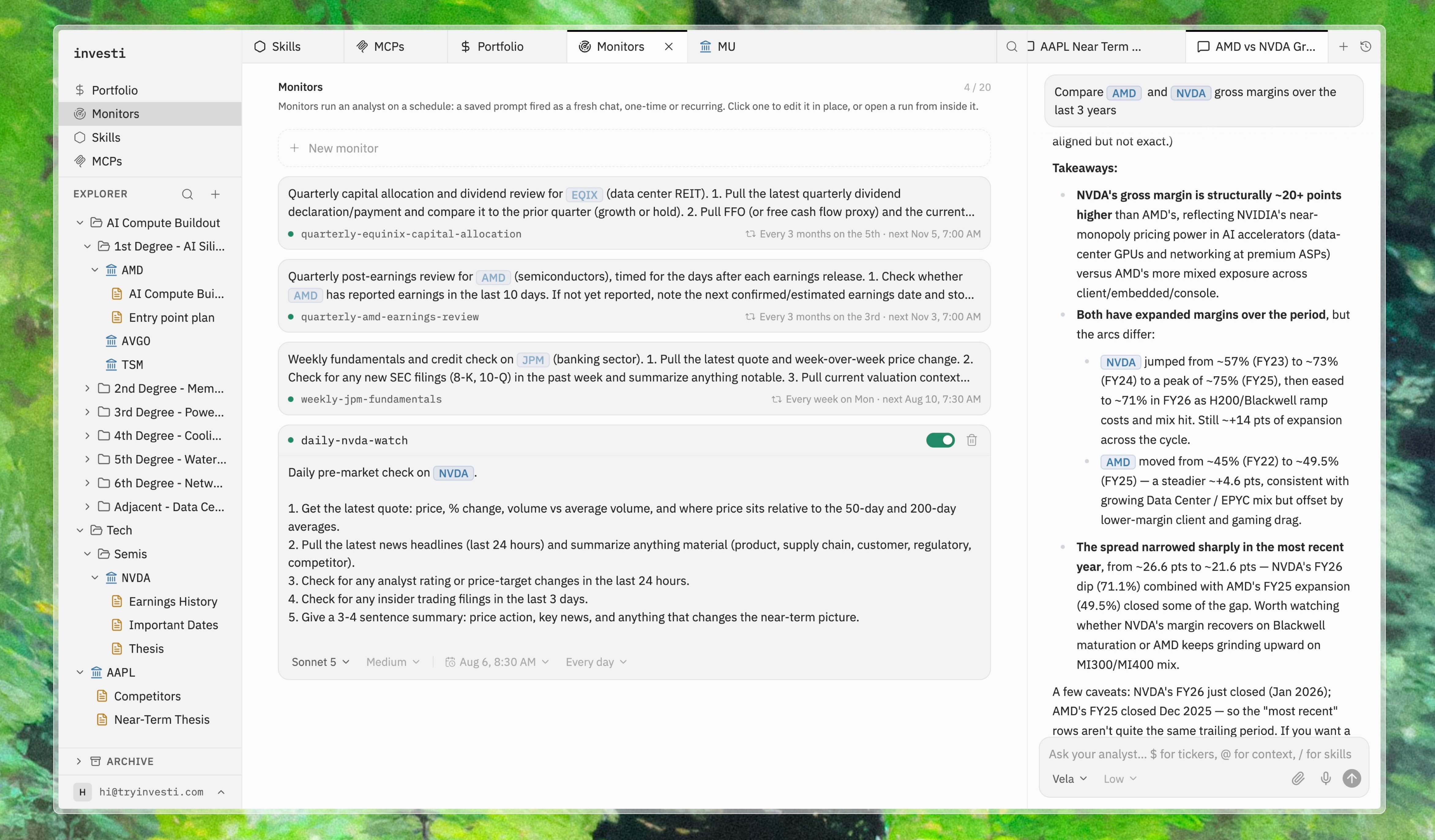
A monitor is an analyst request on a schedule. You write it once, the same request you would type into [chat](/analyst/chat), and it runs when you said it should. Open **Monitors** in the left navigation.
 ## Writing a monitor
The prompt is a full analyst request, so everything that works in chat works here. Reference a company, a note, or a folder of notes with `@`, and the analyst reads them before it starts. A monitor that checks a thesis actually opens the thesis.
```text theme={"theme":{"light":"github-light","dark":"github-dark"}}
Summarize overnight news for @Watchlist/ and flag anything that touches a thesis.
```
Common uses: a morning brief every weekday at 7am, a competitive check on one company every Friday, a one-off read of an earnings release the morning after it drops.
## Scheduling
The schedule works the way a calendar event does: run once, every day, every weekday, every second Thursday, the last Friday of the month. You pick a start time in your timezone and the repeat rule follows from it. There is no cron syntax to learn.
## Every run is a real conversation
When a monitor fires, it starts a fresh chat: a full analyst session with its reasoning and data calls visible, exactly as if you had asked yourself. If a run surfaces something odd, you are already in a conversation about it. Ask the follow-up, pull the filing, update the note.
Runs collect under the monitor that produced them, and a dot marks the runs you have not read yet, so you can catch up from a list after time away.
## The analyst can set them up too
You can also create a monitor mid-conversation: say "check this again every Monday and tell me if anything changed," and the analyst drafts the monitor and shows it to you as a proposal, through the same [review step](/analyst/approvals) used for note edits. Nothing runs on your behalf until you have seen it and said yes.
A monitor stays editable afterward: change the wording, move it to a different day, pause it for earnings season, or delete it when you close the thesis.
## What's next
Reactive triggers (price crosses a level, volume spikes) are not built yet. The plan is for the two to work together, with the threshold as the trigger and the analyst as the response, so a price alert arrives as a run that has already reread your thesis. [An analyst on a schedule](https://tryinvesti.com/blog/an-analyst-on-a-schedule) explains the thinking.
## Writing a monitor
The prompt is a full analyst request, so everything that works in chat works here. Reference a company, a note, or a folder of notes with `@`, and the analyst reads them before it starts. A monitor that checks a thesis actually opens the thesis.
```text theme={"theme":{"light":"github-light","dark":"github-dark"}}
Summarize overnight news for @Watchlist/ and flag anything that touches a thesis.
```
Common uses: a morning brief every weekday at 7am, a competitive check on one company every Friday, a one-off read of an earnings release the morning after it drops.
## Scheduling
The schedule works the way a calendar event does: run once, every day, every weekday, every second Thursday, the last Friday of the month. You pick a start time in your timezone and the repeat rule follows from it. There is no cron syntax to learn.
## Every run is a real conversation
When a monitor fires, it starts a fresh chat: a full analyst session with its reasoning and data calls visible, exactly as if you had asked yourself. If a run surfaces something odd, you are already in a conversation about it. Ask the follow-up, pull the filing, update the note.
Runs collect under the monitor that produced them, and a dot marks the runs you have not read yet, so you can catch up from a list after time away.
## The analyst can set them up too
You can also create a monitor mid-conversation: say "check this again every Monday and tell me if anything changed," and the analyst drafts the monitor and shows it to you as a proposal, through the same [review step](/analyst/approvals) used for note edits. Nothing runs on your behalf until you have seen it and said yes.
A monitor stays editable afterward: change the wording, move it to a different day, pause it for earnings season, or delete it when you close the thesis.
## What's next
Reactive triggers (price crosses a level, volume spikes) are not built yet. The plan is for the two to work together, with the threshold as the trigger and the analyst as the response, so a price alert arrives as a run that has already reread your thesis. [An analyst on a schedule](https://tryinvesti.com/blog/an-analyst-on-a-schedule) explains the thinking.