> ## Documentation Index
> Fetch the complete documentation index at: https://docs.tryinvesti.com/llms.txt
> Use this file to discover all available pages before exploring further.
# Writing your own skill
> Author a SKILL.md in the built-in editor: format, frontmatter rules, reference files, and tips.
A skill is a `SKILL.md` file: YAML frontmatter, then the instructions the analyst follows when the skill is active.
## Create a skill
In the **Skills** view, select **+** to open the skill editor with a starting template:
```markdown SKILL.md theme={"theme":{"light":"github-light","dark":"github-dark"}}
---
name: my-skill
description: What the skill does and when the agent should use it.
---
The full instructions the agent follows when this skill is active.
```
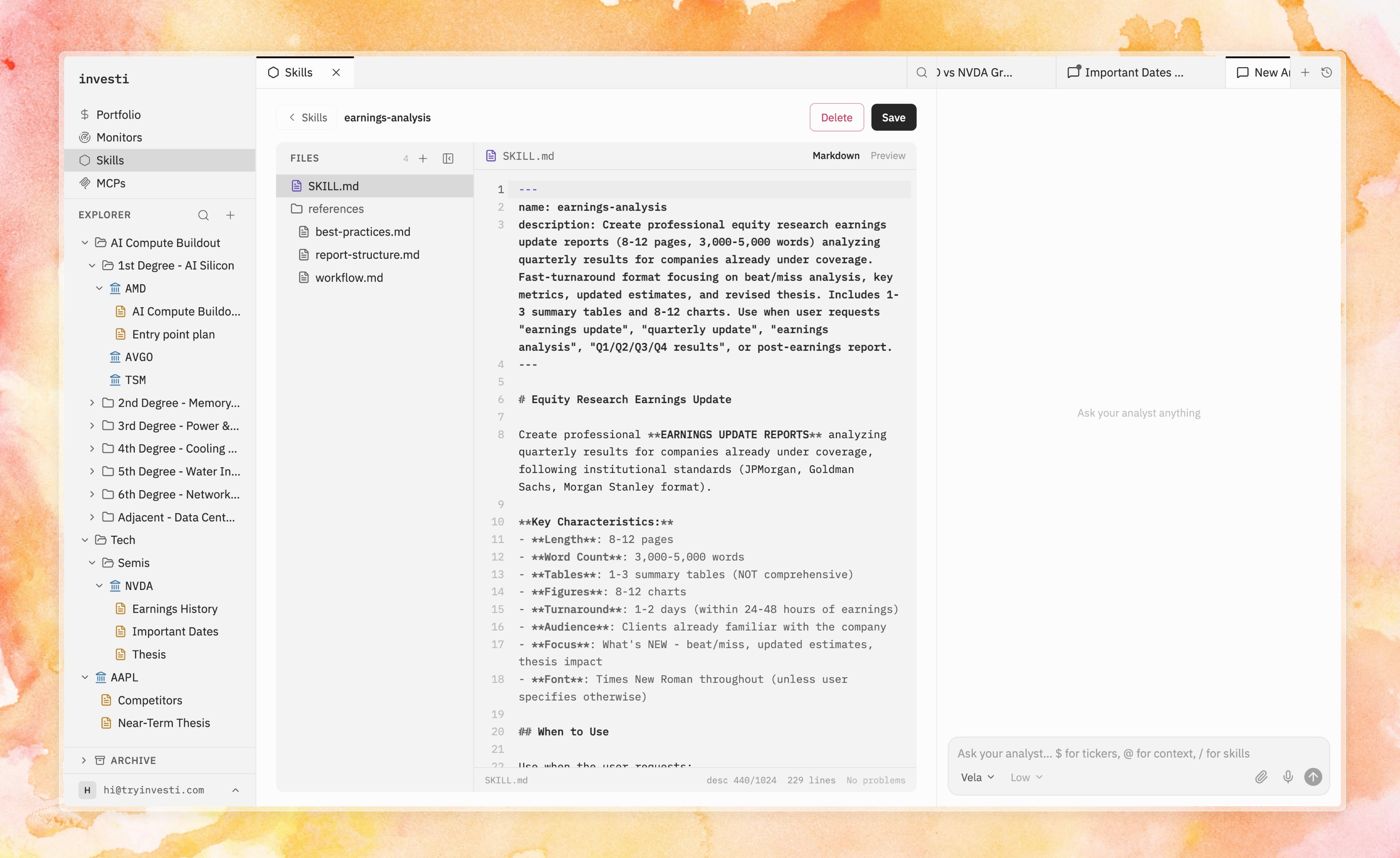 The editor is a mini-IDE: a file explorer over `SKILL.md` plus any bundled reference files, with markdown editing, preview, and — when the analyst proposes changes to a skill — the same diff review used for [notes](/analyst/approvals).
## Frontmatter rules
| Field | Rules |
| ------------- | -------------------------------------------------------------------------------------------------------------------------------------------------------------------- |
| `name` | Required. Lowercase letters, numbers, and hyphens; max 64 characters; unique across your skills. It becomes the `/` slug in chat. |
| `description` | Recommended (warned if missing); max 1024 characters. This is how the analyst decides when the skill is relevant. Make it say *when to use it*, not just what it is. |
## Reference files and assets
Skills can bundle extra files next to `SKILL.md`: a methodology document, a report template, a checklist. The analyst can read them when running the skill, and you can hand one directly to the analyst in any chat with {"@.skills/your-skill/…"} mentions. Binary assets (images, PDFs, spreadsheets) are kept read-only with preview and download.
## Tips for skills that steer
* **Describe when, not just what.** The description drives automatic discovery: "Use when analyzing a new earnings report" beats "Earnings analysis".
* **Write instructions as a process.** Numbered steps with explicit outputs ("produce a table of…", "end with a verdict…") produce consistent runs.
* **Encode your standards.** Thresholds, red flags, required checks — the analyst applies them every time, which is the point: discipline, made repeatable.
* **Remember the boundary.** Skills change the analyst's method, never its permissions. Anything it wants to write to your notes still arrives as [a diff you approve](/analyst/approvals).
The editor is a mini-IDE: a file explorer over `SKILL.md` plus any bundled reference files, with markdown editing, preview, and — when the analyst proposes changes to a skill — the same diff review used for [notes](/analyst/approvals).
## Frontmatter rules
| Field | Rules |
| ------------- | -------------------------------------------------------------------------------------------------------------------------------------------------------------------- |
| `name` | Required. Lowercase letters, numbers, and hyphens; max 64 characters; unique across your skills. It becomes the `/` slug in chat. |
| `description` | Recommended (warned if missing); max 1024 characters. This is how the analyst decides when the skill is relevant. Make it say *when to use it*, not just what it is. |
## Reference files and assets
Skills can bundle extra files next to `SKILL.md`: a methodology document, a report template, a checklist. The analyst can read them when running the skill, and you can hand one directly to the analyst in any chat with {"@.skills/your-skill/…"} mentions. Binary assets (images, PDFs, spreadsheets) are kept read-only with preview and download.
## Tips for skills that steer
* **Describe when, not just what.** The description drives automatic discovery: "Use when analyzing a new earnings report" beats "Earnings analysis".
* **Write instructions as a process.** Numbered steps with explicit outputs ("produce a table of…", "end with a verdict…") produce consistent runs.
* **Encode your standards.** Thresholds, red flags, required checks — the analyst applies them every time, which is the point: discipline, made repeatable.
* **Remember the boundary.** Skills change the analyst's method, never its permissions. Anything it wants to write to your notes still arrives as [a diff you approve](/analyst/approvals).