> ## Documentation Index
> Fetch the complete documentation index at: https://docs.tryinvesti.com/llms.txt
> Use this file to discover all available pages before exploring further.
# Skills
> A reusable process you give the analyst: why the product stays unopinionated, how skills run, and how to install, draft, or write one.
Out of the box, the analyst is unopinionated. It answers however you ask. A skill is a reusable process you give it: the checks you want run, the shape of the write-up, the standards you do not want to retype.
A skill might encode value-investing checks, the way your firm writes an initiation, or a due-diligence checklist entirely your own. The philosophy is always opt-in: chosen, visible, and removable. Never a default.
A skill steers *how* the analyst works. It does not silently change your workspace. Edits to notes and skills still go through [approval](/organize/approvals).
## How skills run
Automatically
When it's relevant
Enabled skills are discovered by the analyst when they match what you asked.
Manually
On this message
Type `/` and the skill's name to run any skill, even one you've disabled for automatic use.
{"/due-diligence-checklist"}
{"$NVDA"}
## Three ways to get a skill
You can also [import](#from-github) a public repository or [upload](#by-upload) a file. Those are the same skill, arriving a different way.
## Ask the analyst to write one
You do not have to open the editor. Describe the process in chat the way you would describe it to a colleague. The analyst drafts the skill and you [review the proposal](/organize/approvals) the same way you review a note.
Write a skill I can reuse on every earnings print. Pull the quarter against the same quarter last year and against consensus, read the transcript for guidance changes, and end with whether the thesis moved. Call it earnings-print.
You can also do this after a run you liked:
Turn the checks you just did into a skill I can reuse on the next print.
Open the draft, read the instructions, and approve it only if you would actually want those steps followed. A skill is instructions your analyst will follow.
## The Skills view
Open **Skills** in the left navigation to manage everything:
* A single search box filters your installed skills and the catalog, and accepts a pasted GitHub URL for [importing](#from-github).
* Each skill has an enable/disable toggle (for automatic discovery) and opens in the editor on click.
* **Browse skills** shows the curated catalog, with one-click installs like *Thesis tracker*, *Financial statement analysis*, *Earnings analysis*, *Initiating coverage*, *Comparable companies*, and *Due-diligence checklist*. Catalog skills are plain instructions like any other, so you can open one in the editor after installing and read exactly what it tells the analyst.
## Installing skills
### From the catalog
Select **Browse skills** to open the curated catalog. Each skill installs with one click.
Try it: install *Earnings analysis*, then in chat:
{"/earnings-analysis"} {"$NVDA"} latest quarter
### From GitHub
Paste a GitHub repository URL into the search box. Investi checks the repository (public repositories only), then shows a preview of every skill it discovered, each with a checkbox and any warnings. Confirm with **Import N skills**.
Private repositories can't be imported; the check will report "Repository not found" for them.
### By upload
Use the upload button to import a `.zip` archive or a single `SKILL.md` file, up to 10 MB. A zip can contain a full skill with its reference files and assets.
### Where to find skills
Skills are plain-text files, so a public repository of them is importable. Places people look:
A skill is instructions your analyst will follow, so treat installing one like hiring someone: read the file before you import it, and prefer sources you recognize. The import preview shows you every file before anything lands in your workspace.
### After installing
| In the Skills view | What it does |
| - | - |
| Toggle **on** | The analyst discovers it automatically when relevant |
| Leave **off** | Manual only. You can still run it with `/` in chat |
| Select it | Opens the [editor](#writing-your-own-skill) so you can read or adjust the instructions |
| Trash icon | Deletes the skill |
## Writing your own skill
### Create a skill
In the **Skills** view, select **+** to open the skill editor with a starting template:
```markdown SKILL.md theme={"theme":{"light":"github-light","dark":"github-dark"}}
---
name: my-skill
description: What the skill does and when the agent should use it.
---
The full instructions the agent follows when this skill is active.
```
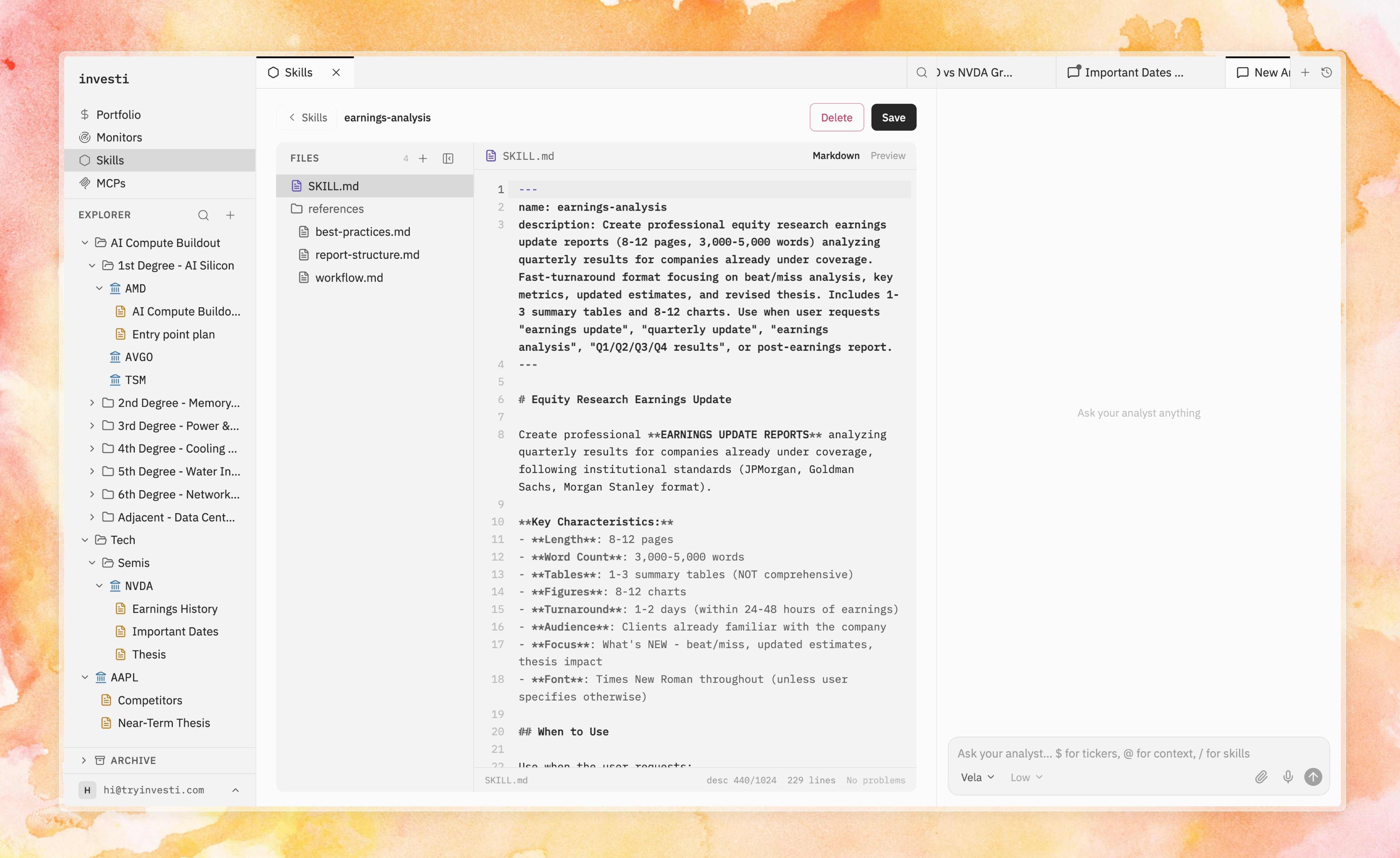 The editor shows `SKILL.md` plus any bundled reference files, with markdown editing, preview, and the same [diff review](/organize/approvals) used for notes.
A skill is a plain-text `SKILL.md` file: a short header with a name and description, then the instructions the analyst follows. You can bundle extra files next to it. Because the format is an [open standard](https://agentskills.io), you can bring a skill in from elsewhere or take yours out.
### Frontmatter rules
The block at the top of the file, between the `---` lines, is how the analyst finds and names the skill.
| Field | Rules |
| - | - |
| `name` | Required. Lowercase letters, numbers, and hyphens; max 64 characters; unique across your skills. It becomes the `/` slug in chat. |
| `description` | Recommended (warned if missing); max 1024 characters. This is how the analyst decides when the skill is relevant. Make it say *when to use it*, not just what it is. |
### Reference files and assets
Skills can bundle extra files next to `SKILL.md`: a methodology document, a report template, a checklist. The analyst can read them when running the skill, and you can hand one directly to the analyst in any chat with {"@.skills/your-skill/…"} mentions. Binary assets (images, PDFs, spreadsheets) are kept read-only with preview and download.
## What a good skill looks like
A good skill reads like a process you would hand a colleague, not like a product description.
| Write | So that |
| - | - |
| Describe when, not just what | Automatic discovery has something to match. "Use when analyzing a new earnings report" beats "Earnings analysis" |
| Numbered steps with explicit outputs | Runs stay consistent: "produce a table of…", "end with a verdict…" |
| Thresholds, red flags, required checks | The analyst applies your standards every time |
```markdown SKILL.md theme={"theme":{"light":"github-light","dark":"github-dark"}}
---
name: earnings-print
description: Use when a company has just reported, or when the user asks for an earnings recap or print review.
---
1. Pull revenue, EPS, and gross margin versus the same quarter last year and versus consensus.
2. Read the transcript for guidance changes and any new risk the company named.
3. Compare those points to the company's thesis note if one exists.
4. End with a short verdict: thesis supported, weakened, or unchanged, and why.
```
## Skills, MCP, subagents, and monitors
A skill can still cause a delegation: {"/earnings-analysis"} on {"$NVDA"} is the parent's process. Pulling several years of statements can still go to the Analyst specialist.
This documentation is built and hosted on [Mintlify](https://mintlify.com), a developer documentation platform.
The editor shows `SKILL.md` plus any bundled reference files, with markdown editing, preview, and the same [diff review](/organize/approvals) used for notes.
A skill is a plain-text `SKILL.md` file: a short header with a name and description, then the instructions the analyst follows. You can bundle extra files next to it. Because the format is an [open standard](https://agentskills.io), you can bring a skill in from elsewhere or take yours out.
### Frontmatter rules
The block at the top of the file, between the `---` lines, is how the analyst finds and names the skill.
| Field | Rules |
| - | - |
| `name` | Required. Lowercase letters, numbers, and hyphens; max 64 characters; unique across your skills. It becomes the `/` slug in chat. |
| `description` | Recommended (warned if missing); max 1024 characters. This is how the analyst decides when the skill is relevant. Make it say *when to use it*, not just what it is. |
### Reference files and assets
Skills can bundle extra files next to `SKILL.md`: a methodology document, a report template, a checklist. The analyst can read them when running the skill, and you can hand one directly to the analyst in any chat with {"@.skills/your-skill/…"} mentions. Binary assets (images, PDFs, spreadsheets) are kept read-only with preview and download.
## What a good skill looks like
A good skill reads like a process you would hand a colleague, not like a product description.
| Write | So that |
| - | - |
| Describe when, not just what | Automatic discovery has something to match. "Use when analyzing a new earnings report" beats "Earnings analysis" |
| Numbered steps with explicit outputs | Runs stay consistent: "produce a table of…", "end with a verdict…" |
| Thresholds, red flags, required checks | The analyst applies your standards every time |
```markdown SKILL.md theme={"theme":{"light":"github-light","dark":"github-dark"}}
---
name: earnings-print
description: Use when a company has just reported, or when the user asks for an earnings recap or print review.
---
1. Pull revenue, EPS, and gross margin versus the same quarter last year and versus consensus.
2. Read the transcript for guidance changes and any new risk the company named.
3. Compare those points to the company's thesis note if one exists.
4. End with a short verdict: thesis supported, weakened, or unchanged, and why.
```
## Skills, MCP, subagents, and monitors
A skill can still cause a delegation: {"/earnings-analysis"} on {"$NVDA"} is the parent's process. Pulling several years of statements can still go to the Analyst specialist.
This documentation is built and hosted on [Mintlify](https://mintlify.com), a developer documentation platform.