

How a proposal works
1
The analyst proposes
During a conversation, an approval card appears in the chat describing the change. At the same time, the affected note gets a warning-colored dot in the explorer (“Change awaiting approval”), with dimmed dots on its parent folders so you can find it later.
2
You review the diff
Open the note to see a side-by-side diff of exactly what would change: your current text against the proposed text, with a review bar on top. When one proposal is part of a batch, the bar says so (“part of N changes”).
3
Approve or decline
Select Approve to apply the change or Decline to reject it. You can act from the note’s review bar or from the approval card in the chat; the two stay in sync. Approving creates a new revision in the note’s version history, so even accepted changes can be rolled back later.
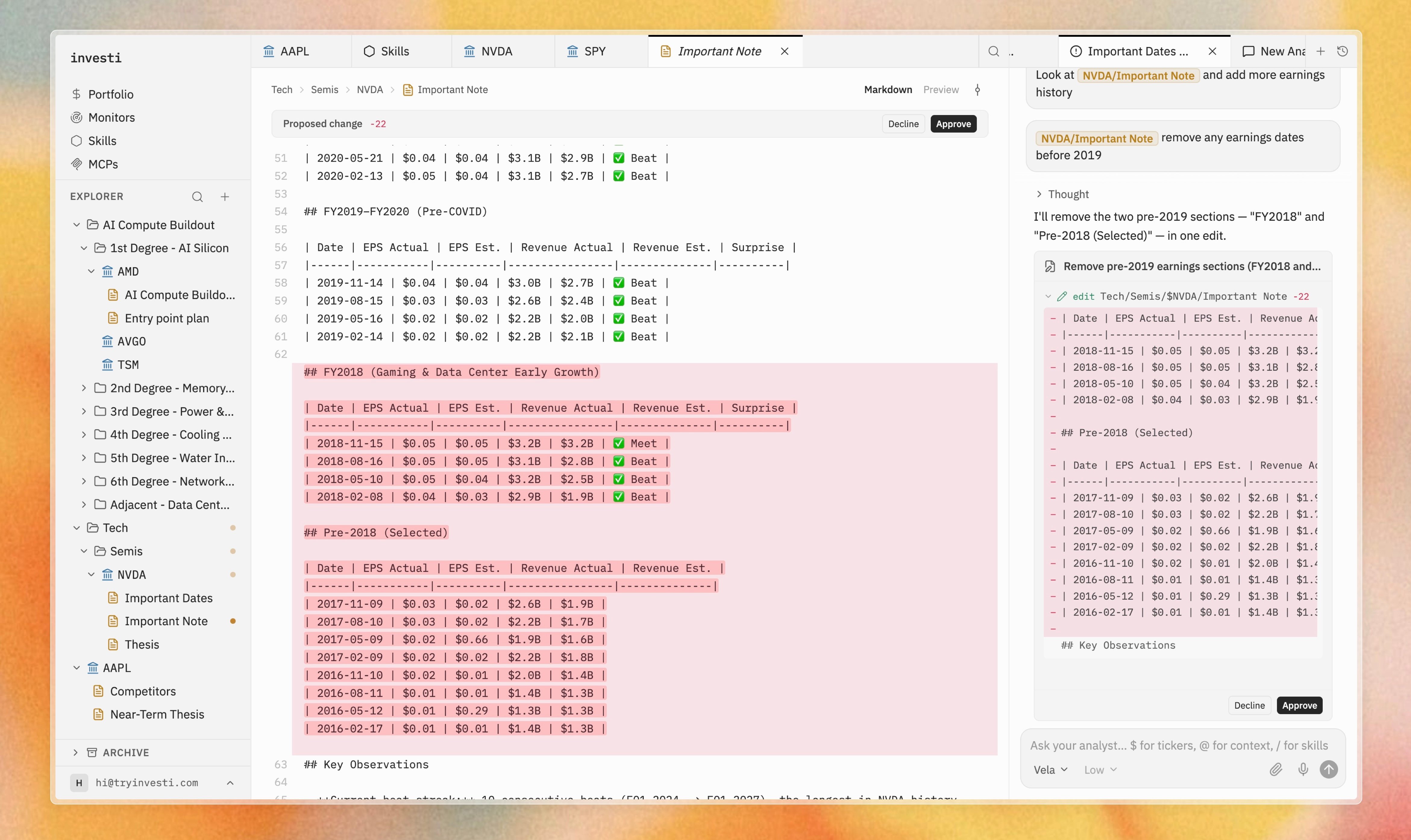
An approval card in chat next to the note's side-by-side diff and review bar
Why it works this way
Skills and conversations steer how the analyst works, but never what it may change on your behalf. The diff-and-approve flow guarantees that:- You always see the exact change before it lands.
- Your workspace never drifts without your knowledge.
- Every applied change is one revision in history, reversible at any time.
Declining a proposal does not end the conversation. The analyst continues with your verdict in hand.